

AD22B04 4 channel DTMF controller commands setting manual
Programming information for the DTMF controller board AD22B04_4 or AD22B04
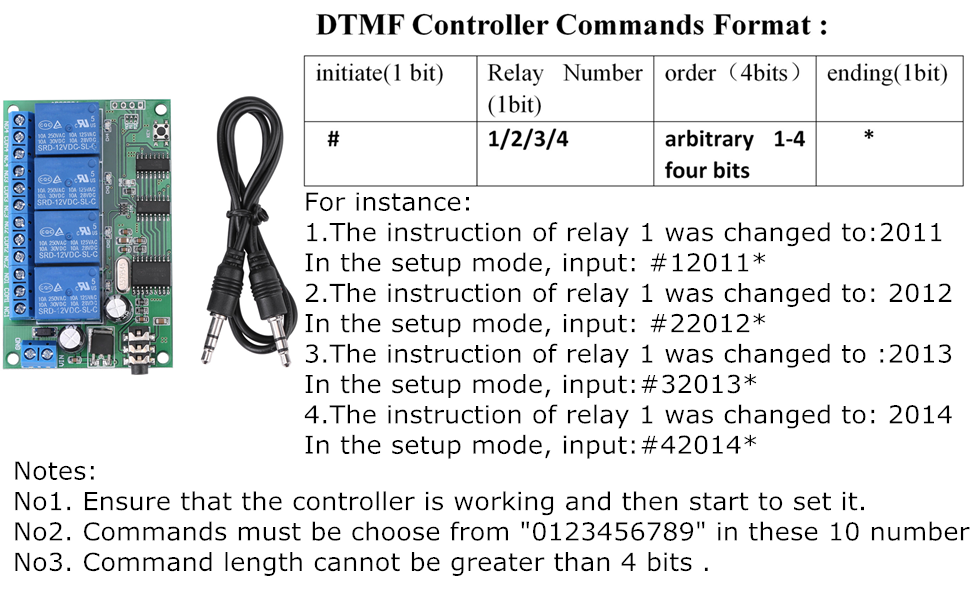
- By default, The AD22B04 4 channel DTMF controller commands are saved in four numbers, ‘1,2, 3, 4.’ but you can also modify appropriately the coding instructions with arbitrary 1-4 four
bitsdigits (0,1,2,3,4,5,6,7,8,9). - The controller has two models, “operating mode” and “setting model”. The default is “operating mode”, but it will be changed into an “setting model” when you press its “key” button.
Factory settings: If you forget the instructions you set before, you can reset it: Keeping pressing consistently the key button about 10 seconds until you see that the LED lights on again. After that, the product of operations will restore to its default commands, ‘1,2, 3, 4.’. - The setup processes:
- First, the DTMF controller should work properly, guaranteeing its power supply and audio cable are connected correctly.
- Second, as pressing the key-button, the LED lights off, the product will go into the “setting model”.
- Thirdly, begin to input commands with mobile phone or computer.
- Fourthly, when finished the third step, activating the product of key- button or powering it up again.
- See image below (note that Chinese “bit” means English “digit” for the AD22B04_4 :
Please see also “Does a Watched Pot Boil“

Recent Comments